

MetaDirectory
A reusable directory engine with country/region branding and built-in custom visitor analytics.
Lovingly built with Django/Wagtail, PostGIS DB, Docker.
Project Summary
Wayfinder is a reusable web directory platform I built for creating searchable directories from messy real-world information. The first version powers four web directories that help businesses find the right managed IT provider for them. But the core idea of this project is broader: build a single directory platform that can be reused for different markets, regions, and business categories without starting from scratch each time.
I chose managed IT companies because they solve a common business problem. Many small and mid-sized companies do not have a full in-house IT team, so they hire Managed Service Providers to handle things like tech support, cybersecurity, backups, cloud tools, and day-to-day IT issues.
The platform includes the main pieces you’d expect from a serious directory: location-based browsing, search, filtering, detailed provider pages, promoted listings, guide content, owner claim flows, and outbound click tracking.
It also tracks which kinds of searches and filters lead people to click through to a provider’s website, which makes the directory more useful for both visitors and listed businesses.
A lot of the work was behind the scenes. I built tools for importing and normalizing data, managing different country versions of the site, tracking performance, and giving business owners access to basic reporting.
The goal was to build something that felt simple on the front end, while still having enough structure underneath to support multiple directories over time.
Wayfinder itself doesn’t rely on AI at runtime, but I used ChatGPT and Codex heavily during development and data preparation, especially for writing helper scripts, shaping import workflows, and speeding up repetitive implementation work.
Why I Wanted to Build This
I wanted to build a product that could do useful work even when I wasn’t actively working on it every day. A directory felt like a good fit for that. It takes a lot of up-front work to collect, clean, structure, and present the data.
Once the system is in place, it can keep serving visitors, ranking in search, tracking engagement, and creating value over time.
I wanted to build something once, then be able to adapt it for different markets without starting over each time.
Directory sites are often either too broad to be helpful or too manual to scale. I wanted Wayfinder to sit in the middle: reusable enough that I could launch versions for different countries or markets, but localized enough that someone searching in a specific city would still feel like the page was built for them.
That shaped a lot of the technical decisions. The platform needed structured location pages, flexible filters, clean listing pages, region-specific branding, and a way to understand whether visitors were actually clicking through to businesses.
It wasn’t just about putting a database online. It was about building a system that could turn messy information into a focused, local discovery experience again and again.
How Wayfinder Is Put Together
Under the hood, Wayfinder is a Django application backed by a PostGIS database and deployed with Docker.
Django handles the main directory experience, admin tools, listing pages, owner flows, reporting views, and routing.
PostGIS is an add-on for PostgreSQL. I chose it because it allowed the platform pull listing data using latitude and longitude coordinates without me having to write my own distance and coordinate calculations.
That’s really useful because the directory is built around businesses finding Managed Service Providers in their local area (“Near Me”) or in specific regions, cities, and metro areas.
I chose managed IT as the first directory because it was a space I understood.
I work in tech and I understand the kinds of services MSPs offer, and I know how businesses tend to evaluate IT support. That made it a natural starting point for building a directory that was more useful than a basic list of company names.
The public site is driven by structured listing data. Each provider has its own detail page, and the browse pages are generated around location and service combinations: country-level pages, province or state pages, city pages, metro pages, and service-specific pages.
That lets the site feel local without needing to hand-build every page. A visitor can start broad, narrow by location, filter by service or other attributes, and then click through to a provider’s website.
The platform also has a multi-region setup. The same codebase can run different versions of the directory for Canada, the US, the UK, and Australia, with region-specific branding, terminology, URLs, images, city lists, promotion pricing, and copy.
So “province” can become “state” or “county,” the homepage can use different assets, and each deployment can feel like its own site while still sharing the same core application.
Wayfinder also includes server-side outbound click tracking, which is different from the browser-focused event tracking I built for Parcours. When a visitor clicks through from a listing to a company website, the click is routed through a tracking endpoint before redirecting them onward.
That lets the platform record which listing was clicked, what page or filters led to the click, and whether the listing appeared as a promoted or organic result.
The main reason for tracking this is to make the directory more useful to listed businesses.
Owners can see how many directory visitors chose to continue from their profile to their company website for more information.
It also supports the business model behind the directory: if a free listing is already getting useful traffic, there’s a clearer case for offering premium placement or promoted visibility.
For listed businesses, there’s an owner dashboard login flow that lets verified business owners access performance data for their listing. Once logged in, they can see basic reporting around how visitors are finding and clicking through from their profile.
Content and supporting pages are handled through a mix of Django templates and Wagtail-powered guide pages. The directory can publish articles, buying guides, and educational content alongside the listings, which helps connect search traffic, user intent, and provider discovery in one place.
From Raw Data To Directory Listings
The data collection side of Wayfinder is intentionally separate from the main application. The platform itself is built to receive structured listing data, while the messy preparation work happens outside the app through a set of Python scripts and review steps.
The raw data usually starts out inconsistent. Business names, locations, websites, service descriptions, categories, and contact details don’t arrive in a clean format, and different providers describe the same services in very different ways.
Before the data can be useful in a directory, it needs to be cleaned, deduplicated, categorized, and turned into something the application can filter and display reliably.
I built a workflow that combines Python scripts with LLM-assisted cleanup.
The scripts do the repeatable parts: parsing CSV files, standardizing fields, generating slugs, mapping cities and regions, and preparing imports.
Raw business data
↓
Collect provider details, websites, locations, and reviews
↓
Python scripts to clean and normalize the CSV data – Pass 1
↓
Python scripts to detect services, languages, certifications, and other useful signals – Pass 2
↓
Write structured prompts for LLM to turn the raw evidence into listing copy
↓
Generate provider descriptions based on scraped data using OpenAI’s API
↓
Validate and reshape the generated HTML into sections the directory can display
↓
Generate location helpers, including city and metro-area groupings
↓
Import the cleaned listings, tags, descriptions, locations, and content into Wayfinder
LLMs are useful for the fuzzier work, like turning inconsistent service descriptions into a more consistent taxonomy or helping generate clearer listing copy from rough source material.
Once the data is cleaned up, it gets imported into Wayfinder as structured listings. From there, the platform can generate location pages, service filters, provider profiles, and reporting views from the same underlying data.
That separation matters: the directory stays focused on serving and managing high-quality listings, while the data preparation process can evolve as I find better ways to collect, clean, and enrich the source data.
Search, Filters, And Directory Discovery
A big part of Wayfinder is helping businesses move from “I need IT help” to a shortlist of relevant Managed Service Providers. For most companies, that search is local by default. They may want someone in their city, their region, or close enough to understand their market and provide on-site support when needed.
The directory is built around that behavior. Visitors can browse by country, region, city, or metro area (ie: “Dallas-Fort Worth”), then narrow the results with search and filters.
They can look for specific services like cybersecurity, cloud support, backup and disaster recovery, help desk support, or Microsoft 365 management. They can also filter around practical buying signals, such as language support, certifications, partner designations, or security/compliance experience.
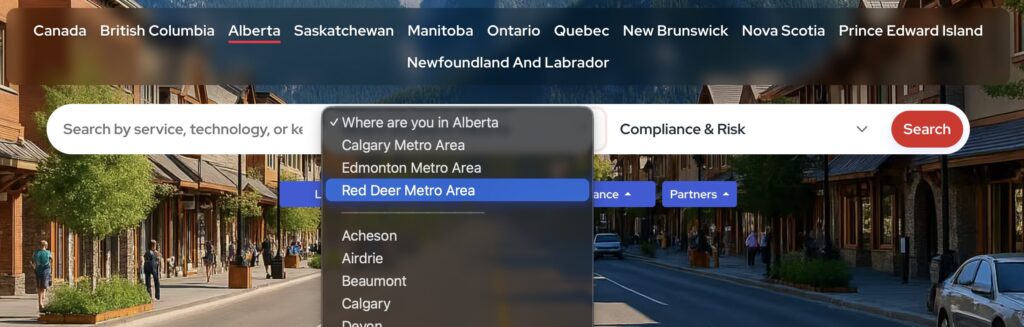
That combination is what makes the site feel hyper-local instead of generic. A page for MSPs in Vancouver or Toronto is not just a static landing page. It is connected to real listing data, service filters, promoted placements, and provider profiles.
The same platform can generate local discovery experiences across many cities, while still letting visitors narrow the list based on what they actually need.
I also added geolocation-based sorting so visitors can choose to see providers closest to them. It is a small feature from the user’s point of view, but it fits the overall goal of the product: make it easier for a business owner or operations manager to find a provider that feels relevant, nearby, and worth contacting.
Event Tracking And Reporting Pipeline
Wayfinder uses server-side tracking to record when visitors click the “View Website” button on a directory listing page. Instead of relying on a browser analytics script, the click first passes through Wayfinder, gets recorded, and then redirects the visitor to the company site.
Because the tracking happens on the server, it isn’t affected by ad blockers, tracker blockers, or users disabling analytics scripts.
The reason I’m tracking these clicks is easy: these are the clearest sign that the directory created value for a listed business. Page views can show interest, but a visitor actively choosing to leave the directory and visit a provider’s website is a stronger signal. It means the listing helped them move from browsing to taking the next step.
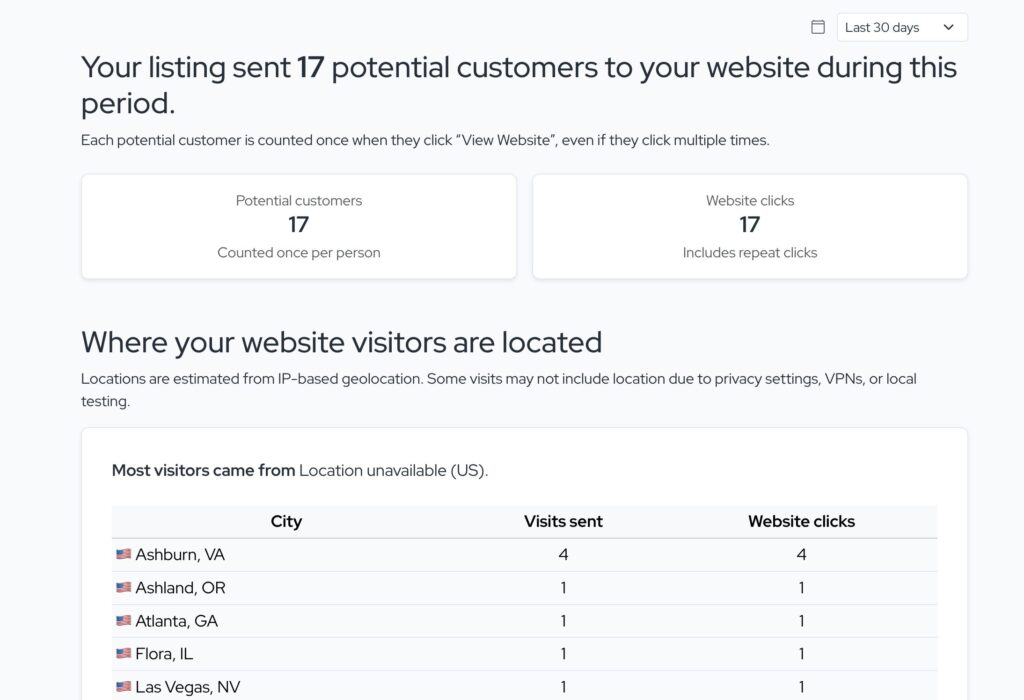
Each outbound click carries useful context with it. Wayfinder can tell which listing was clicked, whether it appeared as an organic or promoted result, and what search or filter path led the visitor there. That helps show what the visitor was looking for, like cybersecurity or general IT support. Those raw events are then processed into reporting tables that appear on the owner dashboard.
This also supports the business side of the platform. If a provider can see that their free listing is already sending visitors to their website, there is a much clearer case for upgrading to premium placement. The tracking turns promotion from a vague visibility pitch into something tied to real visitor behavior.
Owner Dashboard And Listing Claim Flow
Wayfinder gives listed businesses a way to take ownership of their profile. Claiming a listing gives the business access to a performance dashboard that shows how visitors found them, including things like location and filter activity, and how many people clicked through from Wayfinder to the company’s own website..
The claim flow uses DNS verification to prove that the person requesting access controls the business website domain. To claim a listing, the business adds a verification record to their DNS settings. Once Wayfinder confirms that record, the owner can log in to a dashboard for that listing and see the key metrics: how many visitors clicked the provider’s View Website button, where those visitors came from, and what search or filter activity led them to the profile
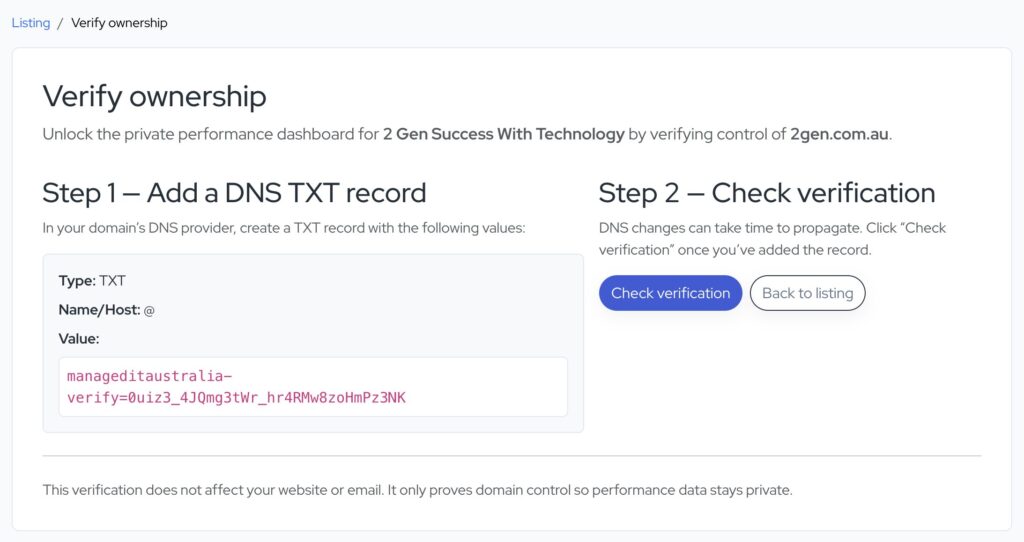
The point of the dashboard is not to become a full analytics product. It’s meant to answer a practical question for the business owner: “Is this listing bringing us useful attention?” If the answer is yes, that creates a natural path toward offering promoted placement or other premium options. It also gives owners more confidence that the directory is more than just a static profile page sitting online.
Multi-Region Architecture
Wayfinder was built so the same core application can run different country versions of the directory. The first version focused on Canada, but I later added support for the US, the UK, and Australia without needing to rebuild the platform from scratch.
Each region can have its own branding, homepage images, terminology, URLs, city lists, and promotion copy. For example, the same directory logic can talk about provinces in Canada, states in the US, counties in the UK, or states and territories in Australia. That lets each site feel local while still sharing the same database structure, listing pages, search logic, tracking, and owner dashboard features.
This was useful because the whole point of Wayfinder is repeatability. I wanted a system where launching in a new region meant configuring and importing the right data, not starting over with a new codebase every time.
AI-Assisted Development Workflow
Wayfinder doesn’t use AI as a runtime feature. Visitors are not interacting with a chatbot, and the directory never calls an LLM when someone searches or views a listing. The AI work happened during development and data preparation.
I used ChatGPT and Codex as engineering tools while building the platform.
They helped me move faster on things like Django views, data import scripts, CSV cleanup, Docker configuration, deployment workflows, and debugging. I still made the architecture decisions and reviewed the output, but AI was useful for getting through repetitive implementation work and exploring better approaches when I hit rough edges.
AI was especially helpful in the data prep pipeline. I used Python scripts and LLM-assisted prompts to turn messy provider data into cleaner listing descriptions, service tags, FAQ-style content, and import-ready CSVs.
This project gave me a practical way to use AI the way many engineering teams are starting to use it: not as a replacement for understanding the system, but as a tool for speeding up research, scaffolding, refactoring, and operational problem-solving.
For a project with Docker deployments, EC2 instances, scheduled reporting jobs, tracking logs, and multiple regional versions, that workflow mattered as much as the code itself.
What I Learned
Wayfinder ended up being a useful project for thinking about operations, not just application code.
Each directory site runs on its own EC2 instance, with the application and database services containerized through Docker. That kept deployments fairly repeatable while still giving each regional directory its own isolated environment.
I also got a better feel for when geographic placement matters. Early on, it made sense to keep the instances in a North American AWS region while I was still building and validating the product.
That tradeoff works well for this kind of product because each directory is region-specific. A Canadian business has little reason to use the UK directory, and a UK business has little reason to search the Canadian one.
Since the audiences are naturally separated, each deployment can be optimized for the region it serves without worrying too much about global traffic patterns.
The bigger lesson was that a “simple” directory still needs real operational thinking. Backups, logs, scheduled jobs, Docker builds, database migrations, media storage, outbound tracking, and reporting pipelines all need to work reliably.
Building Wayfinder helped me think more like an operator: not just “does the feature work locally?”, but “can this keep running, keep collecting data, and be moved or scaled when the audience changes?”
Technologies
- AWS and Docker
- Python, Django, FastAPI
- PostgreSQL
- OpenAI ChatGPT